You need a logo. Maybe you’re launching a startup, rebranding an existing business, or finally replacing that clip art nightmare your cousin made in 2015. The question keeping you up at night is simple: how long does it take to design a logo?
The answer depends on your process, your designer, and how many rounds of “can we try it in blue?” you’re willing to endure.
A professional logo typically takes two to four weeks from kickoff to final files. Budget projects might wrap in five to seven days. Complex rebrands can stretch to eight weeks or more. Timeline depends on designer experience, revision rounds, client feedback speed, and project scope. Rushing kills quality. Planning realistic timelines protects both your budget and your brand.
What actually happens during logo design
Logo design isn’t just drawing shapes until something looks cool.
A professional process includes research, strategy, concept development, refinement, and production. Each phase takes time. Skipping steps saves days but costs you a logo that actually works.
Here’s what most designers do:
-
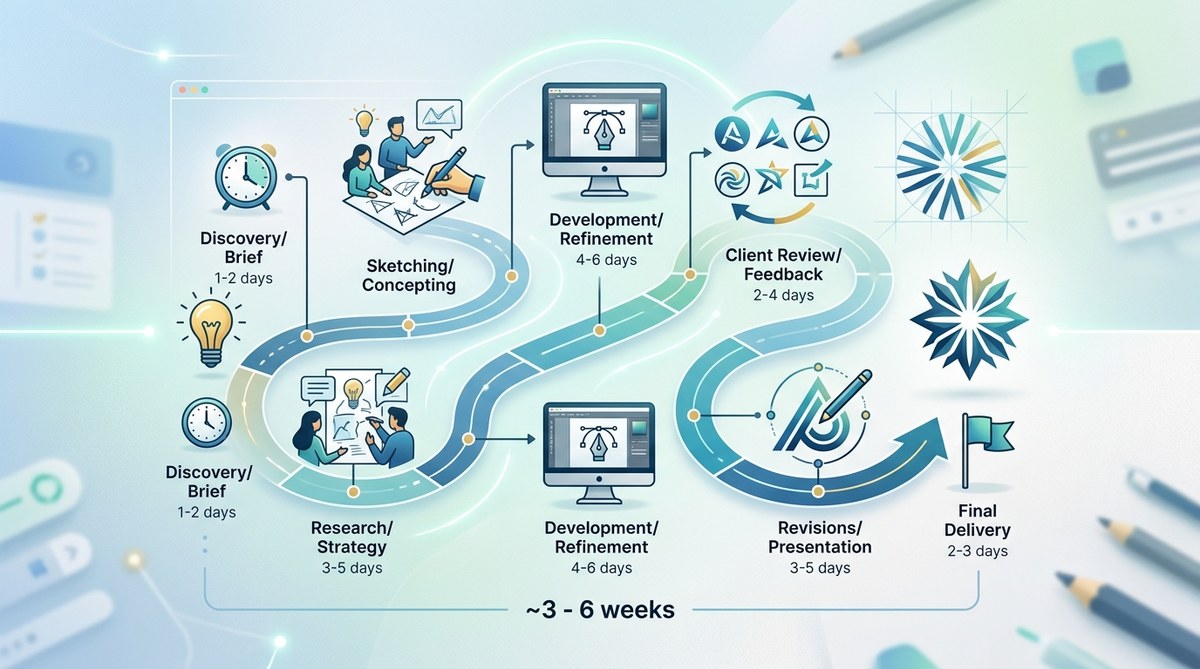
Discovery and research (2 to 5 days): Understanding your business, audience, competitors, and goals. This includes questionnaires, calls, mood boards, and market analysis.
-
Concept development (3 to 7 days): Sketching ideas, exploring directions, and developing two to four solid concepts worth presenting.
-
Presentation and feedback (1 to 3 days): Showing concepts, explaining rationale, and gathering your input. Waiting for client responses often adds days here.
-
Refinement (2 to 5 days): Revising the chosen direction based on feedback. Most packages include two to three revision rounds.
-
Finalization and production (1 to 3 days): Creating all file formats, variations, and documentation you need to actually use the logo.
Total timeline for a standard project: 14 to 28 days.
That’s assuming everyone responds promptly and feedback is clear. Real projects rarely run that smoothly.
How designer experience changes the timeline
A junior designer might spend three weeks on concepts that a senior designer nails in five days.
Experience speeds up every phase. Seasoned designers recognize what works faster. They make fewer false starts. Their instincts are sharper. Their technical execution is cleaner.
But speed isn’t always better.
A junior designer charging $300 might take four weeks. A senior designer charging $3,000 might deliver in two. You’re paying for efficiency and expertise, not just hours logged.
Agencies often split the difference. They assign senior strategists for research, mid-level designers for execution, and juniors for production tasks. This balances speed, quality, and cost.
Freelancers work alone, which can slow things down but also means more consistent vision throughout the project.
Budget tier timelines you can actually expect
| Budget Level | Typical Timeline | What You Get | Common Pitfalls |
|---|---|---|---|
| DIY tools | 1 to 4 hours | Template customization, instant files | Generic results, limited uniqueness |
| Budget freelancer | 5 to 10 days | 1 to 2 concepts, basic revisions | Inconsistent quality, limited strategy |
| Mid-range professional | 2 to 4 weeks | 3 to 4 concepts, full process, revisions | None if scope is clear |
| Premium agency | 4 to 8 weeks | Full brand strategy, extensive research, multiple applications | Overkill for simple projects |
Budget projects move faster because they skip research and strategy. You’re buying execution, not thinking.
Premium projects take longer because you’re paying for the thinking. The logo comes out better but costs more time and money.
Neither approach is wrong. Match your timeline to your needs and budget.
What slows down every logo project
Even well-planned projects hit delays. Here are the usual suspects:
- Slow client feedback: You go silent for a week, the project stalls for a week.
- Vague direction: “Make it pop” isn’t actionable feedback.
- Too many stakeholders: Every new opinion adds revision rounds.
- Scope creep: “Can you also design business cards?” changes everything.
- Unclear goals: Not knowing what success looks like guarantees extra rounds.
- Unrealistic expectations: Asking for Nike-level work on a $200 budget wastes everyone’s time.
The fastest projects have clear briefs, decisive clients, and realistic budgets. Designers can work efficiently when they know what they’re aiming for.
How revision rounds add time
Most logo packages include two to three revision rounds. Each round typically adds three to five days to your timeline.
A revision round is not unlimited changes. It’s one opportunity to provide consolidated feedback on a specific design direction.
Here’s how smart clients handle revisions:
- Collect feedback from all stakeholders before responding
- Prioritize changes by importance
- Explain why something isn’t working, not just what to change
- Avoid contradicting previous feedback
- Trust the designer’s expertise on technical decisions
Designers appreciate clear, thoughtful feedback. They hate getting ten separate emails with conflicting opinions from different team members.
“The clients who get the best logos are the ones who give feedback once per round, not once per day. Consolidate your thoughts. Respect the process. You’ll get better work faster.” — Design studio creative director
If you need a brand system beyond just a logo, expect timelines to double or triple.
Rush projects and their hidden costs
Can you get a logo in 48 hours? Sure. Should you? Probably not.
Rush projects force designers to skip research, limit concepts, and reduce revision rounds. You might get something usable, but you won’t get something great.
Rushed logos often suffer from:
- Generic concepts that look like everything else in your industry
- Technical issues that surface later (poor scalability, color problems)
- Lack of strategic thinking about how the logo supports business goals
- Limited file formats that cause headaches down the line
If you’re facing a hard deadline, be honest with your designer upfront. They can adjust scope and pricing accordingly. Springing a rush timeline mid-project frustrates everyone and rarely improves results.
Some designers charge 50% to 100% premiums for rush work. That’s not greed. It’s compensation for dropped projects, late nights, and compressed thinking time.
Platform-specific logo timelines
Different applications need different timelines:
Social media profile picture: If you already have a logo, adapting it takes one to two days. Creating one from scratch takes the full timeline above.
Website header: Same as social media. Adaptation is fast. Creation from scratch follows standard timelines.
Print materials: Add three to five days if you need print-specific versions. Color modes, bleed, and file setup take extra time.
Merchandise: Add five to seven days for mockups and production-ready files. Each product type has technical requirements.
Animated logo: Add one to two weeks minimum. Animation is a separate skillset with its own timeline.
Don’t assume your logo automatically works everywhere. Testing your logo design before launch catches issues that would otherwise delay production.
How to speed up your logo project without sacrificing quality
You can’t rush good design, but you can eliminate inefficiencies:
- Prepare a thorough brief: Answer all discovery questions upfront. Share examples of logos you love and hate.
- Set clear approval processes: Decide who gives feedback and stick to it.
- Respond promptly: Aim to review concepts within 48 hours of receiving them.
- Trust your designer: You hired them for their expertise. Let them use it.
- Avoid design by committee: Too many opinions dilute vision and add revision rounds.
- Be decisive: Indecision is the biggest timeline killer in any creative project.
The fastest projects I’ve seen had clients who knew exactly what they wanted, communicated clearly, and made decisions confidently. The slowest had five stakeholders who couldn’t agree on anything.
What you should receive at the end
A complete logo package includes more than just a pretty image. Expect these deliverables:
- Vector files (AI, EPS, SVG): Scalable to any size without quality loss
- Raster files (PNG, JPG): Ready for web and social media
- Color variations: Full color, black, white, and grayscale versions
- Layout variations: Horizontal, vertical, and icon-only versions
- Usage guidelines: Basic rules for maintaining consistency
Creating all these files takes one to three days after the design is approved. Don’t expect instant delivery of final files. Proper production takes time.
The complete logo file format guide explains what each file type does and why you need it.
DIY logo tools and their real timelines
Logo generators promise instant results. The reality is more complicated.
Tools like Canva, Looka, and Tailor Brands can produce a logo in 30 minutes to two hours. You pick templates, adjust colors, tweak fonts, and download files.
But that’s just creation time. It doesn’t include:
- Researching what makes logos effective in your industry
- Testing whether your logo works at different sizes
- Creating all the variations you’ll actually need
- Ensuring files are production-ready for print and web
DIY tools work best for temporary solutions or very tight budgets. They’re not replacements for professional design if your brand matters to your business success.
Most founders who start with DIY tools end up redesigning within 12 to 24 months. That’s fine if you’re testing an idea. It’s wasteful if you’re building something meant to last.
Common mistakes that extend timelines
These mistakes add days or weeks to every project:
- Starting without a clear brief: Designers waste time guessing what you want.
- Changing direction mid-project: “Actually, can we try something completely different?” resets the clock.
- Ignoring common logo design mistakes: Fixing preventable errors during revisions wastes time.
- Requesting work outside the original scope: New deliverables need new timelines.
- Providing feedback piecemeal: Ten small requests take longer than one consolidated revision.
The best way to stay on schedule is treating your designer like a professional partner, not a vendor taking orders.
Agency timelines versus freelancer timelines
Agencies often take longer than freelancers for the same project. That’s not inefficiency. It’s process.
Agencies include more stakeholders: account managers, strategists, designers, and creative directors. Each review adds time. But you get more diverse perspectives and quality control.
Freelancers move faster because one person handles everything. Fewer handoffs mean fewer delays. But you’re betting everything on one person’s skills and availability.
For simple logos, freelancers often deliver better value and speed. For complex rebrands involving multiple applications, agencies provide structure that prevents costly mistakes.
How to set realistic expectations with your team
If you’re managing a logo project for your company, here’s how to communicate timelines:
- Add buffer time: If your designer quotes three weeks, tell your team four.
- Explain the process: Help stakeholders understand why design takes time.
- Set clear milestones: Break the project into phases with specific dates.
- Manage feedback collection: Don’t let every team member email the designer directly.
- Plan for delays: Assume at least one unexpected holdup will happen.
Underpromising and overdelivering keeps everyone happy. Overpromising and scrambling creates stress and poor decisions.
Presenting logo concepts effectively speeds up approval and reduces revision rounds.
What happens after the logo is done
Getting your logo is just the beginning. You still need to:
- Update all brand materials: Website, social media, email signatures, business cards.
- Create a brand style guide: Document how to use your logo correctly.
- Brief your team: Make sure everyone knows how to apply the new logo.
- Plan the rollout: Coordinate timing across all platforms.
This implementation phase takes one to four weeks depending on how many touchpoints you have. Don’t launch your logo on Monday and expect everything updated by Friday.
Planning your logo project timeline
Here’s a realistic planning framework:
For a startup launching in three months:
* Start logo design eight to ten weeks before launch
* Allow four weeks for design
* Reserve four weeks for implementation
* Build in two weeks of buffer time
For a rebrand of an existing business:
* Start six months before public announcement
* Allow six to eight weeks for design and strategy
* Reserve eight to twelve weeks for implementation across all materials
* Build in four weeks of buffer time
For a simple refresh:
* Start six to eight weeks before you need it
* Allow two to three weeks for design
* Reserve two to three weeks for implementation
* Build in one week of buffer time
The bigger your business, the longer implementation takes. A solo consultant can update everything in a weekend. A company with 50 employees and multiple locations needs months.
Knowing when to invest more time
Sometimes spending extra time upfront saves years of regret.
If your logo will appear on:
* Physical products or packaging
* Vehicles or signage
* Uniforms or merchandise
* Long-term marketing materials
Invest in a thorough process. Mistakes are expensive to fix once you’ve printed 10,000 boxes or wrapped three delivery trucks.
If you’re just testing an idea or creating something temporary, a faster process makes sense. Match your timeline and budget to your actual needs.
Deciding between minimalist or detailed logo styles affects complexity and timeline.
Real project timelines from actual designers
I surveyed 30 professional designers about their most recent logo projects. Here’s what they reported:
- Fastest project: 3 days (existing client, clear brief, one concept, no revisions)
- Slowest project: 14 weeks (rebrand with extensive research and multiple applications)
- Most common timeline: 3 weeks (standard process, professional client, normal revisions)
- Average revision rounds: 2.3 per project
- Biggest delay factor: Waiting for client feedback (mentioned by 27 out of 30 designers)
The takeaway: Most projects take three to four weeks when both parties do their jobs well.
Getting started with realistic timelines
Planning your logo project starts with honest assessment:
- How important is this logo to your business?
- What’s your realistic budget?
- How much time do you have before you need it?
- How many stakeholders need to approve it?
- What deliverables do you actually need?
Answer these questions before contacting designers. You’ll get more accurate quotes and timelines.
Remember that cheap, fast, and good form a triangle. You can pick two. Cheap and fast won’t be good. Good and fast won’t be cheap. Good and cheap won’t be fast.
Most businesses should aim for good and reasonably fast at a fair price. That usually means three to four weeks and a mid-range budget.
Your logo represents your business for years. A few extra weeks upfront beats years of regret over a rushed decision.
Start your project with realistic expectations, clear communication, and respect for the process. You’ll end up with a logo you’re proud to use and a timeline that didn’t drive everyone crazy.
