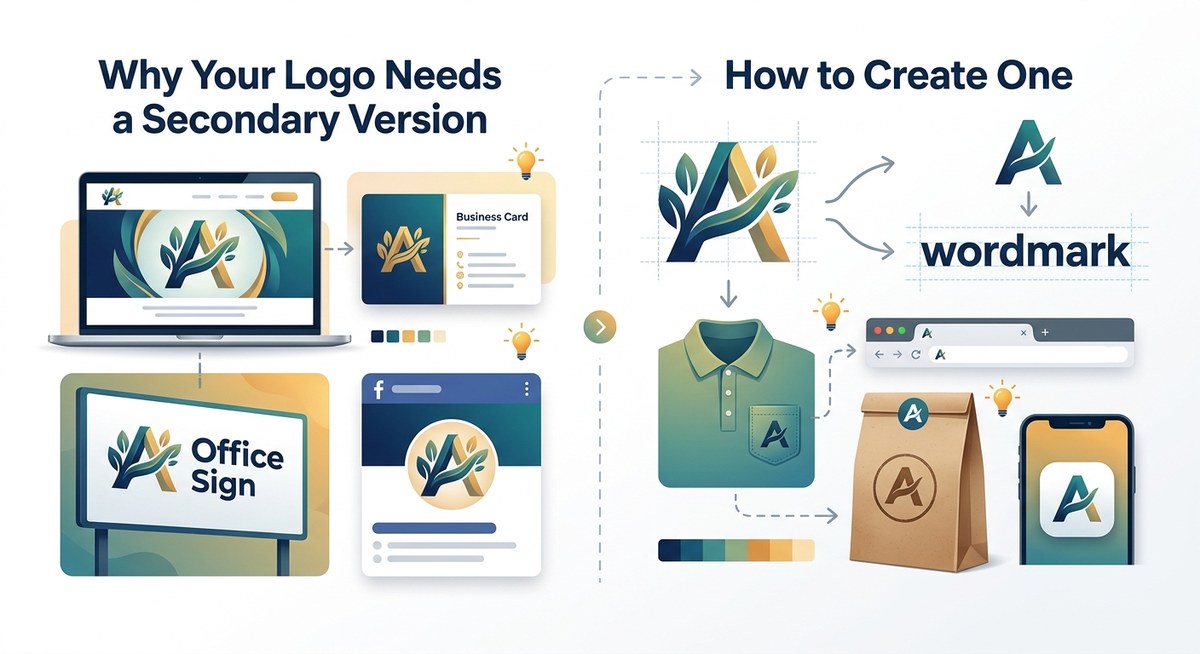
You have one main logo. You love it. You spent time (and probably money) getting it just right. But here is the hard truth: that single logo will not work everywhere. Shrink it down for a social media profile picture and suddenly the fine print is unreadable. Try to fit it onto a pen or a favicon and you lose half the details. That is exactly why you need a secondary logo. It is not a replacement for your primary mark. It is a smarter, simpler version that keeps your brand looking crisp and professional no matter where it shows up.
A secondary logo is a simplified version of your primary logo designed for small spaces, low-resolution contexts, and situations where your main mark feels cramped or unreadable. It strips away fine details, removes small text, and often shifts to a horizontal or icon-only layout. Every brand needs at least one to stay consistent across digital platforms, print materials, and merchandise. Building one takes about an hour and follows a clear, repeatable process.
What Is a Secondary Logo Anyway?
Think of your primary logo as the full band playing at a stadium show. Your secondary logo is the acoustic set. Same song, same vibe, but stripped down so it works in a smaller room.
A secondary logo keeps your brand recognizable while removing elements that become problematic at small sizes. It might drop a tagline, simplify an icon, or rearrange text into a more compact layout. The goal is always the same: maintain brand identity while gaining versatility.
Most design systems include three to four logo variations. Your primary logo handles the big moments: websites headers, storefronts, business cards. Your secondary logo handles everything else: social media avatars, app icons, email signatures, promotional products, and anywhere space is tight.
When You Absolutely Need a Secondary Logo
Not every business needs one on day one. But most do by year two. Here are the situations where a secondary logo stops being optional and starts being essential.
- Your logo contains small text that becomes illegible below a certain size.
- You are active on social media platforms with circular or square profile picture crops.
- You sell merchandise like hats, pens, or apparel where embroidery space is limited.
- You have a tagline that works great on a billboard but looks messy on a phone screen.
- You want to use your logo as a watermark on photos, videos, or documents.
- You need a favicon for your website (that tiny 16×16 pixel icon in browser tabs).
If any of these sound familiar, you are leaving brand consistency on the table by not having a secondary version ready to go.
The Three Logo Variations Every Brand Should Have
Before you start designing, it helps to understand the full family of logos you are building toward. Here is how they typically stack up.
| Logo Type | Best Use Case | Typical Layout | Level of Detail |
|---|---|---|---|
| Primary Logo | Website header, storefront, letterhead | Stacked or horizontal with full name and tagline | Highest |
| Secondary Logo | Social media, small print, merchandise | Horizontal or icon with brand name only | Medium |
| Submark / Icon | Favicon, watermark, stamp | Standalone symbol or initials only | Lowest |
Your primary logo gets all the glory. Your secondary logo does all the heavy lifting in cramped spaces. And your icon or submark becomes the silent workhorse for tiny applications. Together they form a system that keeps your brand looking intentional everywhere.
How to Create a Secondary Logo in 6 Steps
Building a secondary logo does not require starting from scratch. You already have the raw materials. You just need to simplify them with intention.
1. Start with Your Primary Logo File
Open your main logo file in whatever design tool you use. Adobe Illustrator, Figma, Canva, Affinity Designer, any of them work. You want the editable vector version, not a flattened PNG. Vectors let you scale, remove, and rearrange without losing quality.
2. Identify What Must Stay
Every secondary logo needs to remain recognizable as your brand. Circle the non-negotiable elements. For most brands, that is the icon or symbol and the business name. Everything else is on the table.
3. Remove What Creates Noise
Taglines usually go first. Then fine details like thin stroke lines, gradients, shadows, or intricate textures. Small text that works at full size becomes a smudge at reduced sizes. Cut it.
4. Reorganize the Layout
Your primary logo might be stacked vertically. That layout does not work in a square social media frame. Shift to a horizontal arrangement with the icon on the left and the name on the right. Or go icon-only if your brand mark is strong enough to stand alone.
5. Simplify the Icon (If Needed)
Some icons are too complex to read at 100 pixels wide. You might need to create a simplified version with fewer shapes, thicker lines, and less detail. Think of it as the outline version of your icon. It should read clearly at the size of a postage stamp.
6. Test at Actual Sizes
Do not judge your secondary logo on a 27-inch monitor. Drop it into a mockup at 100 pixels wide. Look at it on your phone. Print it small on a sticker. If you cannot read it, simplify further. Keep going until it works at the smallest size you will actually use.
What to Keep and What to Cut
This decision is the hardest part for most people. You have attachment to elements you worked hard on. But a secondary logo is not about showing everything you can do. It is about preserving recognition in limited space.
Keep these elements:
– Your brand icon or symbol (simplified if needed)
– Your business name (or a recognizable abbreviation)
– Your brand colors (one or two at most)
– Your primary typeface (no font switching)
Cut these elements:
– Taglines and slogans
– Fine decorative lines
– Gradients and drop shadows
– Small text below 8 point
– Multiple colors (simplify to one or two)
“A secondary logo is not a compromise. It is a translation. You are taking the same message and making it legible in a new context. The best brand systems make this translation feel effortless because the designer was ruthless about what to remove.” – Brand designer tip, Anonymous Design
Common Mistakes That Ruin a Secondary Logo
Even experienced designers make these errors. Watch out for them.
Mistake 1: Using the exact same artwork at a smaller size. Shrinking your primary logo does not create a secondary logo. It creates a tiny version of a design that was never built for that scale. Fine details disappear. Text becomes unreadable. The result looks amateurish.
Mistake 2: Adding elements to compensate for space. Some people panic when they remove details and try to add new graphics or text to fill the void. Do not. Empty space is your friend. A clean, simple mark with breathing room looks professional.
Mistake 3: Changing fonts between versions. Your secondary logo should use the same typeface as your primary logo. Swapping to a different font creates confusion and weakens brand recognition. Consistency builds trust.
Mistake 4: Ignoring color constraints. In some contexts, you cannot use multiple colors. Embroidery, screen printing, and single-color digital applications all require a one-color version of your secondary logo. Always build a black-and-white version alongside your full-color one.
A Practical Process You Can Follow Today
Let me give you a repeatable workflow you can finish in under an hour.
- Duplicate your primary logo file so you have a fresh canvas.
- Remove the tagline, any decorative elements, and small text.
- Rearrange the remaining elements into a horizontal layout.
- Simplify your icon by removing internal shapes and thin strokes.
- Test the result at 100 pixels wide on a white background.
- Create a one-color version in solid black.
- Export as SVG and PNG at multiple sizes.
That is it. You now have a working secondary logo that you can test across your platforms.
How to Know if Your Secondary Logo Is Working
You do not need to guess. Run it through a few real-world tests.
- Put it in a social media profile frame. Can you still identify the brand from across the room?
- Try it on a mockup of a pen or a lanyard. Does it wrap around the curve without distorting?
- Print it at 1 inch wide on a sticker. Is every element legible?
- Use it as a favicon. Does it read clearly in a browser tab among other tabs?
- Show it to someone who does not know your brand. Can they tell it is the same company?
If you get five yeses, your secondary logo is ready. If you get any nos, go back and simplify the element that failed.
Why This Matters for Your Small Business or Side Project
You might be thinking, “I am not a big corporation. Do I really need multiple logos?” The answer is yes, especially if you want to look like you have your act together.
A single logo that gets stretched, squished, and cropped to fit different spaces tells people you are making it up as you go. A logo system with a primary, secondary, and icon version signals professionalism. It says you thought about how your brand shows up in the world.
That level of polish matters when a potential customer scrolls past your Instagram profile or sees your logo on a conference name tag. Small details build trust over time.
Building Your Full Brand System
A secondary logo is just one piece of a larger puzzle. Once you have yours dialed in, you can start thinking about how all your visual assets work together as a system.
Read our guide on how to build a brand style guide that actually gets used to lock in consistency across fonts, colors, and logo usage rules.
If you are still unsure whether your current logo needs adjustments, check out our brand audit checklist: is your visual identity working against you to identify weak spots before they cost you customers.
And remember, a strong brand is not about having one perfect logo. It is about having the right version ready for every moment. The 7 logo design mistakes that make your brand look unprofessional often come down to failing to adapt to context.
Your Secondary Logo Is Ready to Build
You do not need to hire a designer for this. Open your existing logo file, strip away the non-essentials, and test it at small sizes. The process takes less than an hour and the payoff is a brand that looks professional everywhere it appears.
Start with the horizontal layout. That single variation will solve 80 percent of the tight-space problems you face. Add an icon-only version later if your brand mark is strong enough to carry recognition on its own.
Your business deserves to look good at every size. Your secondary logo makes that possible.
