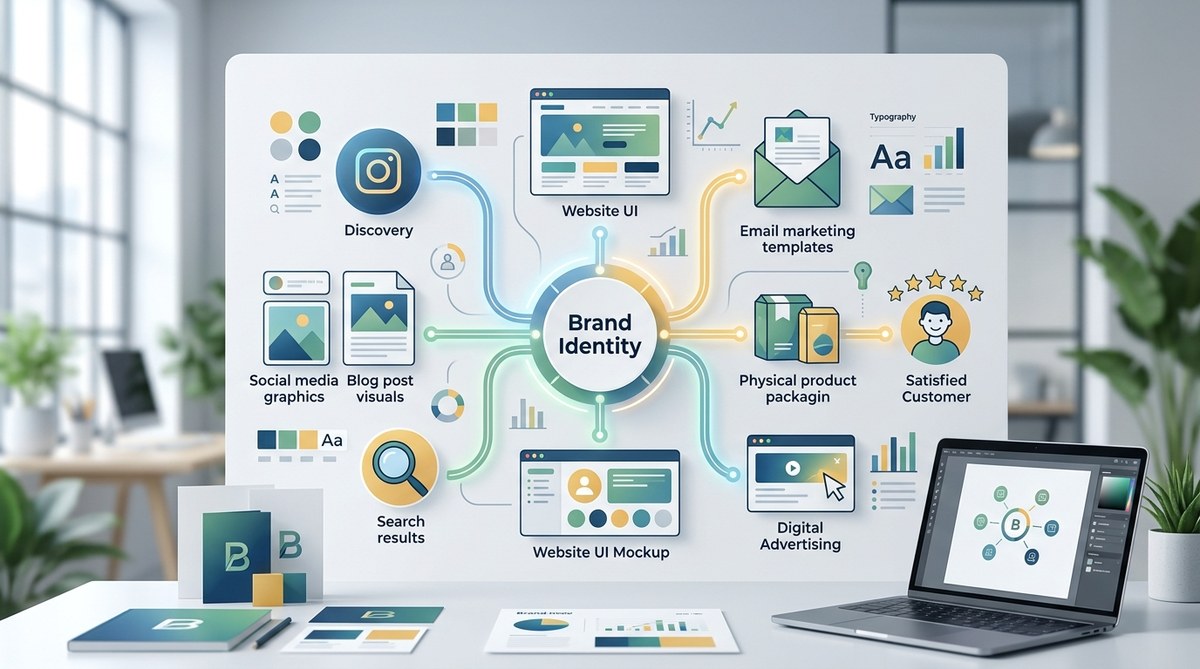
You have a beautiful brand style guide. Your logo is sharp. Your color palette is meticulously chosen. But when a customer experiences your brand, does it feel like one unified story? Or does it feel like a series of disjointed visuals? That gap is where trust goes to die. And that is exactly the problem visual customer journey mapping solves. It connects the dots between your brand identity and your customer experience, ensuring every visual interaction feels intentional and familiar.
Visual customer journey mapping is the practice of auditing and designing every visual brand touchpoint a customer encounters. Instead of just mapping actions or emotions, this method focuses on logos, colors, typography, imagery, and UI components across channels. A cohesive visual ecosystem reduces cognitive load, builds brand recognition, and increases conversion rates. By following a structured 5-step process, you can identify gaps, eliminate visual friction, and create a seamless experience that feels unmistakably like your brand.
What Makes Visual Customer Journey Mapping Different
Standard customer journey maps track actions, emotions, and pain points. That is useful. But visual customer journey mapping zooms in on the design layer. It asks: What logo does the customer see in the ad? What font loads on the landing page? Is the illustration style consistent in the onboarding email? Does the app UI use the same button styles as the website?
This practice creates what we call a visual ecosystem. It is a connected system of design elements that guides the user without them even realizing it. When done right, the customer never thinks about the design. They just feel like they are in the right place. This taps directly into what makes a brand memorable: psychology-backed design principles.
Why Visual Consistency Matters Across the Full Journey
Imagine walking into a Target store where the red is slightly orange. Then you open the app, and the logo is a different shade. You get an email, and the typography is scrunched. You feel it immediately. You might not say “that’s the wrong hex code,” but you will think, “This feels off.”
Here is what happens when the visual journey breaks:
- Cognitive load spikes. Inconsistent visuals force the brain to work harder to recognize the brand.
- Trust erodes. 60 percent of consumers expect consistent experiences across channels. Inconsistency signals disorganization or even carelessness.
- Conversion takes a hit. A seamless visual flow guides the eye naturally to the call to action. Broken visuals distract and confuse.
Before you start fixing things, it helps to know what you are working with. Run a brand audit checklist to see if your visual identity is working against you. This will give you a clear baseline.
The 5 Step Process to Map Your Visual Ecosystem
Let us get practical. Here is a numbered process you can run this week.
-
Collect every customer facing asset.
Go beyond the obvious. Grab your ads (social, search, print), your website (every page), your email flows, your app, your packaging, your invoices, your customer support portal, and your physical signage. Lay them all out physically or in a shared Figma board. -
Identify the key journey stages.
Map these assets to the classic stages: Awareness, Consideration, Decision, Retention, and Advocacy. Which assets live where? For example, a TikTok video is Awareness. A product demo page is Consideration. A thank-you card in the package is Retention. -
Audit the visual language.
For each touchpoint, score it against your brand guidelines. Is the logo usage correct? Is the color palette right? Is the imagery style consistent? Does the UI component match the design system? Mark it as Pass, Warning, or Fail. -
Find the “visual handoffs.”
These are the moments a customer moves from one channel to another. Think seeing an ad on Instagram and clicking through to the website. If the two experiences look like they belong to different companies, you have a problem. This is where most friction occurs. -
Create a remediation roadmap.
Prioritize the gaps. Fix the handoffs first (they cause the most whiplash), then tackle the warnings. Update the assets, or better yet, create a centralized asset library or template system. A strong foundation helps immensely. Learn how to build a brand style guide that actually gets used.
Techniques and Mistakes at a Glance
Here is a table to clarify what works and what does not when you are doing this work.
| Technique | What It Does | Common Mistake to Avoid |
|---|---|---|
| Visual Asset Inventory | Creates a complete catalog of every design asset in use. | Auditing only the marketing assets and ignoring product UI or customer support materials. |
| Style Guide Compliance Check | Measures how faithfully each touchpoint applies the brand rules. | Having a style guide that is too rigid or outdated, causing teams to abandon it entirely. |
| User Flow Design Overlay | Maps visual elements directly onto user behavior flowcharts. | Focusing only on the digital path and leaving out physical touchpoints like packaging or events. |
| Emotion vs. Visual Mapping | Plots the customer’s emotional state against the visual complexity they see. | Using this to justify complex, cluttered designs instead of simplifying the visual load. |
A Real-World Example: The Coffee Brand
Let us say you are a direct to consumer coffee brand. A customer sees an ad on Instagram (Awareness). The photo is warm, lifestyle oriented. They click through to a landing page (Consideration). That page should feel like a direct extension of that ad. Same filter, same fonts, same layout rhythm.
If the landing page uses a sterile, corporate stock photo and a different sans serif, the customer hesitates. That hesitation is the kiss of death for conversion. By mapping the visual journey, you can ensure that the warmth of the brand permeates every single step, from the packaging to the subscription portal. This is one of those 5 common branding mistakes that make your business look unprofessional that are so easy to fix once you see them.
Expert Advice on Visual Ecosystems
“Visual consistency is the handshake of the digital age. If the handshake is weak or changes depending on the situation, the trust is gone. Mapping your visual ecosystem is not just a design exercise. It is a fundamental business strategy for building a brand that people can rely on.”
This kind of thinking applies everywhere. For example, if you are struggling to get results on social media, the problem might not be the copy. It might be the visual inconsistency. Check out why your social media posts aren’t getting engagement and how to fix them. The fix is often simpler than you think.
Common Mistakes to Avoid in Visual Journey Mapping
Even experienced teams fall into these traps.
- Mapping only the “happy path.” Customers often take detours. Make sure your visual consistency holds up even when a user goes to the FAQ page or cancels a subscription.
- Forgetting the audio visual connection. In 2026, video dominates. Does your video style (motion graphics, color grading, sound design) match your static visual identity?
- Relying solely on a PDF style guide. A PDF is static. A visual ecosystem requires a dynamic, accessible design system or a template library that teams can actually use.
- Designing in silos. The UX team designs the product. The marketing team designs the ads. The support team uses canned responses. If these teams do not share a visual language, the journey breaks.
- Not testing with real users. You are too close to the brand. Show the journey to a stranger. Ask them to point out moments that feel “off.” They will find them.
Your Visual Ecosystem is a Living Document
A map is useless if it stays in a drawer. The same goes for your visual ecosystem. It requires maintenance, regular audits (we recommend checking it every quarter), and a team that is empowered to use it. This is not just about making things look pretty. It is about making the customer’s path feel inevitable, natural, and unmistakably yours.
Start small. Pick one journey path (like “New Visitor to Sign-up”). Map it out. Open your eyes to the gaps you find. You will be surprised at how many easy wins are hiding in plain sight. And once you fix those, you will see the difference a truly seamless visual experience makes.
